Using Sanity for internal tools
Sanity isn't just for public websites. Here's how I use it as the backend for three small apps that help me keep Bits&Letters running smoothly.


We’re huge fans of Sanity as the default content backend for both client websites and our own web presence. (If you’re reading this on bitsandletters.com , these words came to you straight from our Sanity studio.) Sanity’s reputation as the headless CMS best suited for high-performance, content-driven experiences, especially when AI agents are part of your dev team, is well deserved and growing like crazy.
Sanity’s live content APIs also proved themselves last year on the live-data backend I built for Stripe’s Black Friday campaign, Stripe City , where real-time metrics were displayed on 11 tiny LCD screens built into a miniature downtown.
But a lot of you may not realize Sanity is also an excellent backend for sites and apps for your own internal use. Many of the same qualities that make it a go-to choice for public web experiences also make it the easiest way to spin up robust internal tools:
Fast, global access to your data. Unlike many database or backend-as-a-service platforms, access to data stored in Sanity’s Content Lake is globally available by default — you don’t need to think about which database engine to use or which datacenter region it should live in.
Sanity Studio is a ready-to-use, extremely hackable admin surface. Studio is built on React, and is designed to be deeply customized. Authentication, including roles and privileges, are provided by the Sanity platform — that’s one more thing you don’t have to build. In cases where Sanity Studio isn’t customizable enough, Sanity also has a React-based app framework allowing you (or an agent) to build whatever you want and deploy it to Sanity’s cloud.
Real-time collaboration just works in Studio. For the most part, working together on documents or data in Studio works the way you’d hope, with presence bubbles in the toolbar, comments, and multiple cursors flying around.
Agent-friendly by default. Sanity’s MCP server and APIs work super well in all of the most widely-used AI platforms. You can have an agent work in the context of your codebase, where it can see how your data’s schema fits into your intended UIs and workflows. But I find that Claude and Codex can do a pretty good job working with Sanity-hosted data just by looking at schemas pushed to the cloud and figuring things out from context.
What we’ve built on Sanity
Earlier this year I built an AI-driven website evaluation tool , partly to see what this ‘vibe coding’ thing is about, mostly to automate some of the first-pass audits I do for clients and prospects when they reach out.
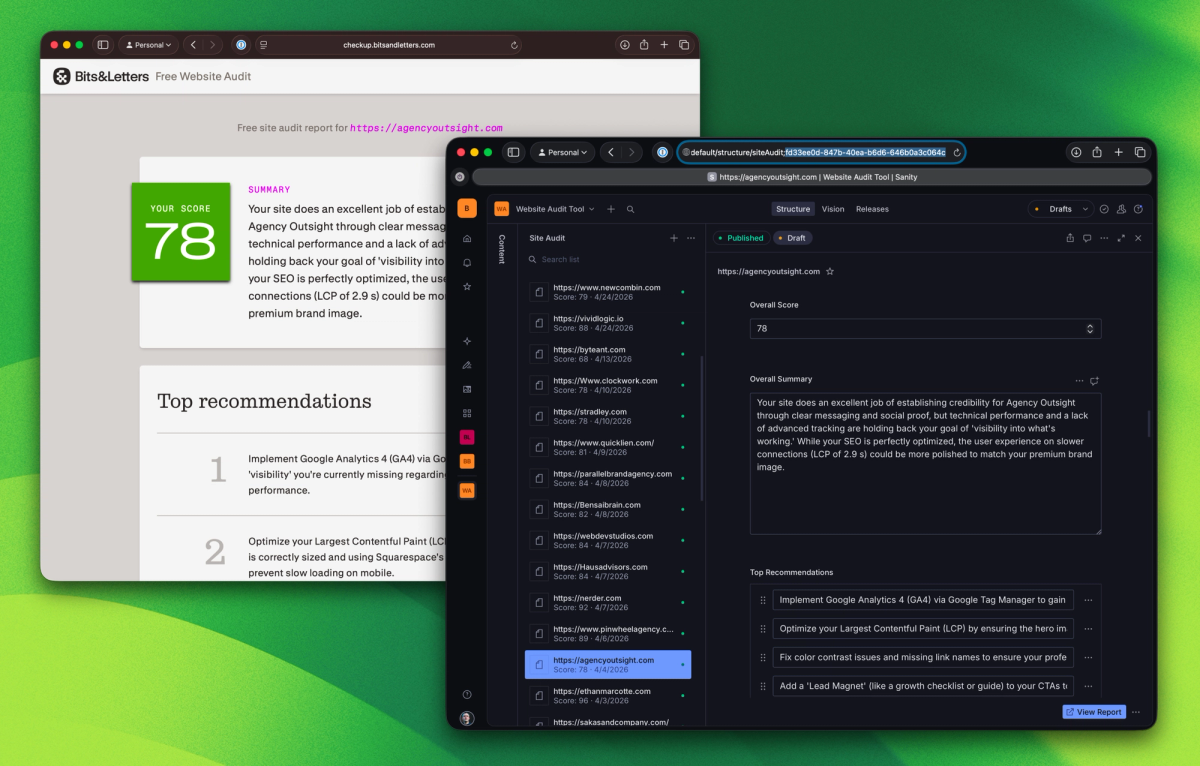
After filling out a quick questionnaire, the tool fetches your site’s source code and content, calls Google’s PageSpeed Insights API, then has one of Google’s Gemini models analyze the data and construct a report that matches the app’s Sanity schema. (I keep meaning to upgrade this to GPT-5.6 Terra or a newer open-weight model, but Gemini has been working out fine.)
Each report is saved to Sanity so the user (and I) can reference it later and share it with a team. My various biz-dev agents have access to this dataset; if someone I don’t already know requests an audit, their info gets added to my CRM and I get a Slack notification to potentially follow up.
Like a lot of services businesses, I have to send prospective clients nice-looking documents outlining what I can do for them and what it will cost. I have a Pages template that’s easy to use and fully on-brand. But I often still have to spend more time tweaking formatting than I’d like, and of course, I can’t automate any of the process with AI.
Structurally, my proposals are pretty normal documents — headings, paragraphs, lists — plus a few tables and other components to present things like pricing options and expected timelines. One day, while fussing with yet another Pages doc, I realized this would work pretty nicely as a Portable Text JSON structure in Sanity, and my proposals tool was born.
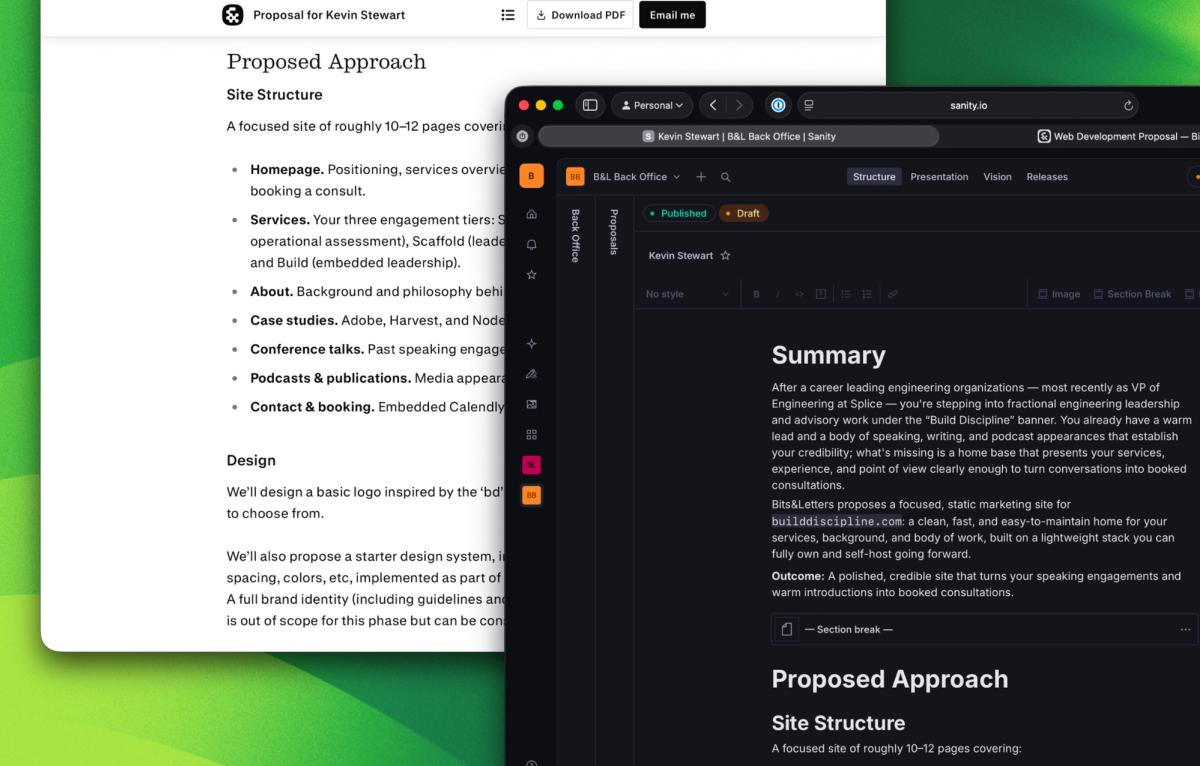
Instead of an attached PDF, clients get a proposals.bitsandletters.com URL with a unique/secure identifier. (URLs also have a friendly slug with their name, e.g. build-discipline or rill-data, but this is just cosmetic, to make it feel more personalized.)
Proposals don’t have any login requirement — anyone with the URL can read it — and there’s a PDF download available if someone wants one to send around to their team.
Unlike the checkup reports, which live in a standard, publicly-readable Sanity dataset, the proposals are saved to a private dataset called “backoffice”, ensuring proposals are only readable from the web app.
Having set up a private dataset came in handy a few weeks later when onboarding a new WordPress client. I needed to get login credentials for their server, which absolutely should not be sent over email.
There are a number of pastebin-type services for this kind of thing, but I thought rather than have yet another third-party app to keep track of, I could build on what I’d already done in Sanity, and so I spun up the secrets tool.
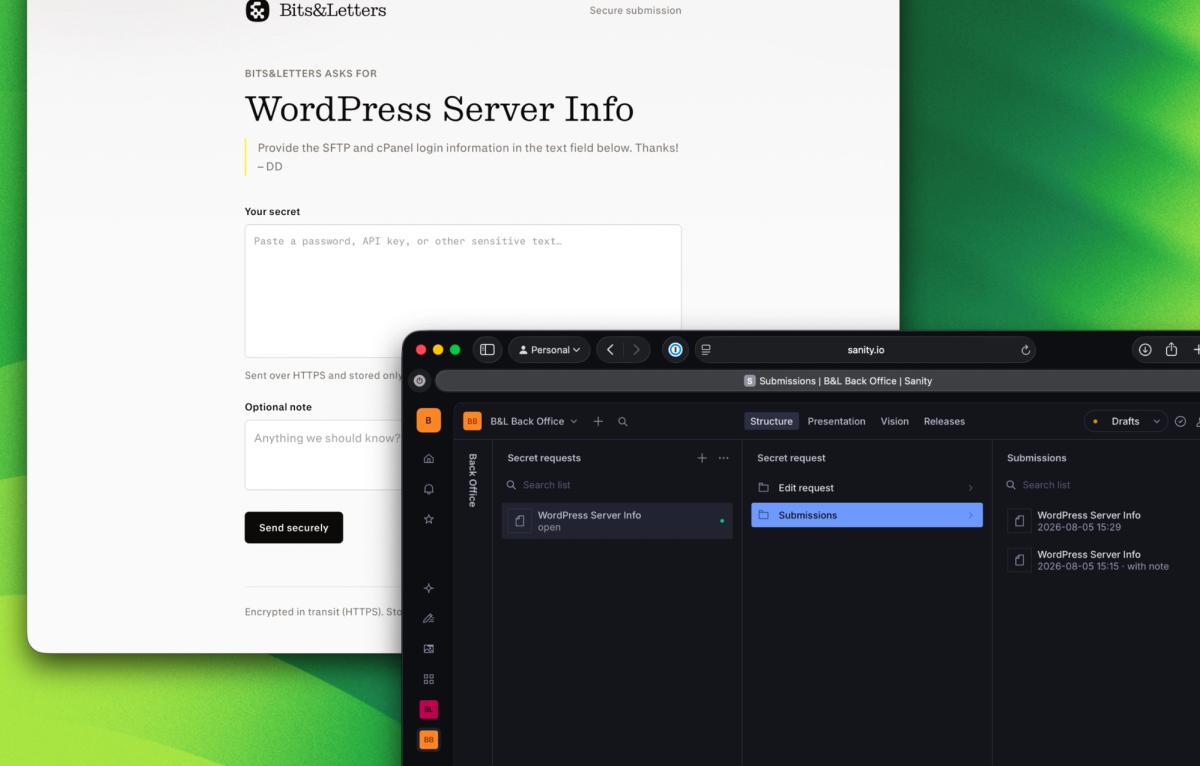
In the backoffice Sanity Studio, I create a secret request with a title and a short note to the client explaining what I need. Once it’s published, the studio shows the request’s unique secrets.bitsandletters.com URL — complete with a one-click copy button — to send to the client.
Each request has an open/closed status field that flips to closed once the form has been used, helping to prevent abuse. If the client needs to resubmit any info, I can turn the request URL back on from the Studio, or just generate a new request.
To get the secrets tool up and running quickly, I made a few compromises that are on my roadmap to fix. The biggest one is that submitted data isn’t encrypted at rest — Sanity’s API authentication is the main security boundary, and a cron job purges secrets after 30 days, so it’s probably fine for our low-volume needs, but it’s on my radar to harden this even more.
Your content operating system is your business operating system
The throughline in all of these so far: a lot of businesses’ internal tool needs can be served by a platform that’s really good at handling text — especially rich text — with admin interfaces that can be spun up in minutes, driven by the same schema as the data layer.
That’s where Sanity shines for both public-facing and private data, and I’m already working on more tools that build on the same excellent set of primitives, such as a tool for automating contract authoring, and a micro-CRM to tie all of these together.