How I Think About AI Agents
How AI agents work, why I give them focused jobs, and how I use them at Bits&Letters to find leads, gather newsletter ideas, and keep track of tasks.


I have an AI agent that looks for links for my newsletter, another that looks for potential clients, and another that goes through my email turning tasks into tickets. There’s even one that serves as a kind of HR department for the other bots, which is a funny thing to find yourself needing.
“Agent” is easly the most overused term in AI discourse, and lots of things are being called “agentic” just to sound more impressive so their makers can raise money and impress their friends. And this also can impact how we plan and design agentic apps — not everything with AI is an agent, and you can do many things agents can do without AI. So let’s break it down:
An agent is an AI-powered tool that can take action, not just answer questions, and which can use an LLM to define and fulfill multi-step work plans.
When you set up an agent, you’re putting a few things together:
- An AI model that receives and interprets your requests, then decides how to carry out the work.
- A persistent set of instructions that explain its job, how it should behave, and where it should ask for help. (If you use Codex or Claude Code, this is the job your
AGENTS.mdfile is doing.) - Context about the work to be done, which helps agents better understand what to do. Like instructions, context can take the form of text files stored in Git. But it can also consist of access to internal knowledge bases, Slack channels, docs, etc. For coding agents, your code itself is context.
- Finally, tools the agent can use to look things up and take action, like searching your email, creating a ticket, or writing code.
(Here you can start to see how these pieces work together: the agent uses a tool to search your email, and the messages it finds become part of its context.)
Creating a ‘hub’ or ‘coordinator’ agent
Probably the highest-leverage kind of agent a business can create is a central, managed chatbot that has secure access to the company’s information and tools. You could ask it “where are we with this client?” and have it look through the relevant docs, conversations, and tasks to put an answer together. From there, you could ask it to create tickets for outstanding work or help draft a follow-up.
Part of the appeal here is that, rather than everyone on your team setting up their own ChatGPT or Claude accounts, then spreading context and systems access around willy-nilly, you can do that setup once and then make it available to the team. Shared instructions and connections give your people a useful starting point, which they can build on for their own work. And, as you add agents with more specialized jobs, this central agent can become a ‘hub’ for talking to and coordinating them.
Vercel CEO Guillermo Rauch has posted a bunch about @v
, their internal agent that serves as a central ‘hub’, doing the same broad job as ChatGPT or Claude, but with greater security and full company context:
Every day-to-day job at Vercel now involves@v. It's growing exponentially both in daily interactions and token use. … It's an expert in finance, comms, docs, marketing, engineering, business analytics. It's seeded by the skills we gave it and we update, but it's also constantly improving.
It already keeps memories and personalized workflows and schedules on a per-user basis. For example, I knew skills.sh hit 1M skills and I shared this on these forums because I asked @𝚟 to periodically check and remind me.
… If agents become the foundation of (and even synonymous with) modern companies, you being in complete control, from source → runtime → data → token, seems like a pretty big deal to me.
On a smaller scale, Figma product manager Ezra Mechaber posted on Threads a few weeks ago about “PM OS”, a set of skills and connectors that PMs at Figma can use to automate analyzing research & user feedback or writing PRDs.
Give most agents one clear job
While the best place to start is a ‘hub’ agent like Vercel’s @v, especially for larger teams just starting on their AI journey, part of the beauty of agents is that you can spin up as many as you need.
A few agentic apps — like the aforementioned Town, or Meta’s new, more consumer focused Muse — are designed around each person having their own personal agent. In Town, each person has a ‘Townie’, and the Townies can interact with each other around shared connectors and business context — basically Vercel’s hub model, but where each person has its own virtual assistant.
While it’s cool to imagine a virtual town full of virtual gofers, I find that when you give an AI agent too many different jobs, its performance suffers at all of them, especially when its scope includes recurring routines and autonomous work. Agents tend to perform better if each one has only one remit, so its instructions and skills can be more focused.
“Dispatch” is a Grok Bot agent that scans my email and a couple of websites (like Hacker News) for links and topics to include in my weekly newsletter. Its colleague “Rizzo” is responsible for prospecting and lead-finding, searching the web and my Sales Navigator account for folks who might be good for me to contact about what we’re doing at B&L.
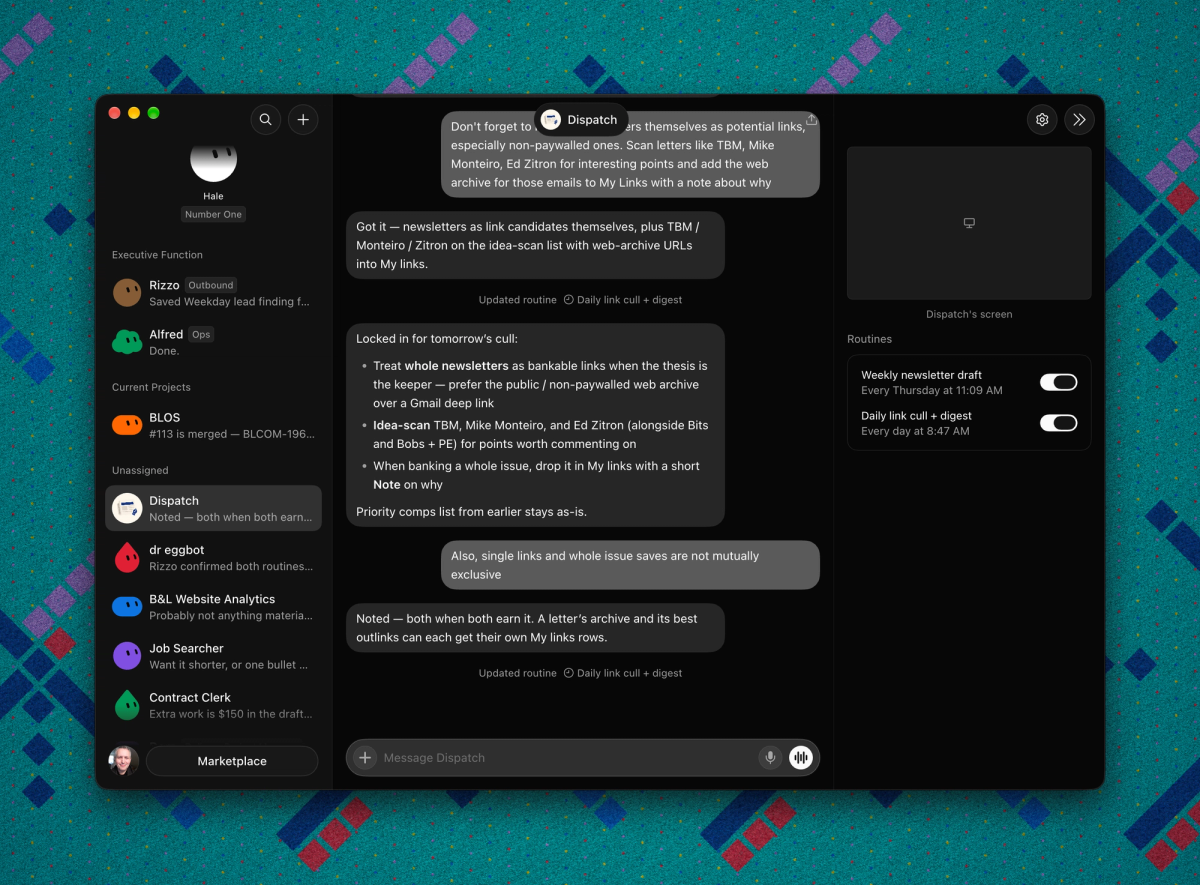
I have a Grok agent running weekly reports on our website’s traffic and SEO, one that scans my email for tasks and creates Linear tickets in a private “OPS” project, and one named “dr eggbot” — copied from a template by Lauren “poteto” Tan , one of Grok Bot’s developers — that serves as a kind of HR department, governing and auditing the other bots.
Aside from keeping each agent focused, assigning specific jobs to each one can help you — the human in the loop — keep tabs on what work is happening where, and which notifications from your team of robots are most worth your time and attention.
Connections are everything
An agent is only as good as the data and tools it has access to, and the kinds of jobs they can do may depend on how easy (and secure) it is to hook AI up to other services.
For individuals or entrepreneurs, the biggest advantage of hosted agent apps like Grok Bot or Town is that someone else has done the hard work of connecting their stuff to everyone else’s services. Hooking an agent up to your Gmail, for example, is a matter of clicking a couple buttons and authorizing the agent app in your Google Workspace account.
On the other hand, custom agents — either running on your own machine(s) with
OpenClaw
, or written in frameworks like
Eve
or
Flue
and deployed to the cloud — can be harder to connect to other stuff without help from a developer, but give you maximum understanding and control over what the agent is doing. Bots like Vercel’s @v are custom agents, loaded with internal skills and plugins to more precisely tailor them to their company’s workflows and business context.
Automating attention
For me, the appeal of agents like these — whether specialized or general, hosted or custom — is that they can keep tabs on things like my website’s traffic or tracking tasks that aren’t very glamorous and which would require forming habits or building systems to make sure I do them consistently. Even when tasks require decisions or actions from me, agents can do the work to distill a lot of information and make it really simple and concrete for me to honor my commitments and get things done.
If you’re thinking about setting up an agent, consider what you’d ask someone to keep an eye on for you if you could. What should they look for, and when would you want to hear about it? What information or tools will the agent need? Then, pick whatever harness app seems best and give it a try — you can see whether its updates help you get things done, or whether you’ve just given yourself another inbox to check.