
I've built websites and apps for more than 20 years. For the past two, this agency has focused on B2B marketing sites built on Sanity and Astro, and a lot of our client projects started out on no-code site builders like Webflow, Framer, or HubSpot.
In this guide, I'll cover when and why teams outgrow those platforms, what to replace them with, and who should run the replacement.
What B2B buyers look for on your site
Compared to consumer-oriented sites, B2B websites tend to have a lot more content, and many different kinds of content. Where a luxury hotel's brand site needs just a few beautiful pages and links to a booking app, a buyer evaluating a vertical SaaS or data platform has deeper questions about feature depth, how it compares against competing solutions, and where it sits in a broader ecosystem. Your website has to answer them.
B2B content also has to stay fresh. Companies looking at software or services to adopt need to know what people are saying about it today, and how it's kept up with changes in the marketplace, so they can know what to expect in year two or three if they choose to buy.
So a B2B site needs more than a bigger sitemap. The team behind it needs a reliable way to add and update pages in step with the needs of their market. Without a good content operating system, your website stops being an asset, and becomes a constant source of unglamorous, low-value work.
These are the pages our clients ask for most, or end up adding themselves via content systems we build for them. As it happens, these are also some of the content page builders are worst at handling:
- Pricing that explains the product. The pricing page is the second-most-visited page on Rill's website. In addition to helping buyers understand plans and features relative to prices, Rill's team needs flexibility to update this page in lockstep with their offer.
- Capability and use-case pages. Each new capability or audience segment eventually needs its own page, for reasons like SEO or giving a sales team resources to easily send to prospects. Publishing delays or blockers here can become sales blockers, not just marketing annoyances.
- Case studies with real detail. Buyers want to see proof from companies like theirs — the problem, the solution, the numbers. These can be blog posts (or at least presented in a blog-like format), but more specialized businesses often need custom components like data visualizations or rich media embeds to tell the most convincing stories possible.
- Comparison and integration pages. Feature matrices, "us vs. them" pages, and partner directories — content to help buyers understand how your solution compares with alternatives and fits into your ecosystem. Here, content is often shared across many pages, one way a marketing team can use their CMS to scale a site with less duplicated effort.
- A point of view. Blog posts, reports, and guides that show how you and your team think, something else B2B buyers consider when choosing vendors they may rely on for years. This content also feeds SEO and AI search, aiding discovery and lead generation.
- Docs. For technical products, docs are often the most-read part of the site. These may share the same content platform as more marketing-oriented pages, or may be managed separately alongside your product's codebase, depending on who owns documentation and their preferred workflow.
All of these will change often, and many should include similar content.
That's where page builders start to struggle — while a tool like Webflow makes it easy to compose pages, most of your content is embedded in your site's design, making it harder to scale your content without copying the same text or media to dozens of pages.
What's wrong with Webflow?
Webflow is a great platform when you're first starting out, but starts to show strain as teams or their marketing needs grow. Though Webflow is the most popular visual site builder among B2B startups, the problems I outline below apply also to any no-code or low-code site builder. Clients and other startups we've talked with have hit the same walls with Framer, HubSpot, Wix, Squarespace, and WordPress (with or without a builder like Elementor).
You're managing pages, not content. Your content lives inside whole pages, with text and assets mixed in with design. Aside from copying and pasting, there's no easy way to reuse it. A lot of marketers accept this because it's how documents and slide decks work, without knowing there's a better way to operate.
You can't manage content without managing design. Giving marketers the freedom to create or even redesign pages without a developer can be tremendously powerful. But with that power comes the responsibility to think about the site's design and architecture with every change. Pages stay consistent only if everyone builds them consistently, and a change to global styles can quietly break pages nobody meant to touch.
Hosting is included, but so is lock-in. One of Webflow's biggest advantages is that publishing is built in, with everything from design tools to a global CDN covered by one monthly bill. The flip side is that, if any part of that stack stops working for you, you can't replace just that part — when clients on Webflow have come to us with content-shaped pain points, the prescription is almost always a full rebuild on a new platform.
It's hard to hand the work to AI agents. Webflow has an API and an MCP server, but layout and design changes still happen in the Designer. If your team wants Claude Code or Codex to build a new page or update a component, they need a codebase to work in. (Rill felt this most: a company shipping agentic analytics couldn't use agents on its own website.)
It's great for pages, but not app-like experiences. The web can do much more than distribute content. What if, on top of CMS-driven pages and a contact form, you want a pricing calculator? An AI tool that helps prospects compare your product with other options? Docs that know who you are and pre-fill code samples with a ready-to-use API token? On Webflow, each of these means a custom-code workaround, if it's possible at all.
What does your website need to do?
Visual builders can work well for simple content sites. When you need complex content models, to support many people editing and publishing at once, or capabilities that go beyond what a static site can handle, it's time to explore more advanced options.
To see where you stand, ask how often your team needs to do each of the content or marketing-ops jobs in the table below:
Job | Webflow | Framer | WordPress | Sanity + Astro |
|---|---|---|---|---|
1. Publish SEO and marketing pages | Good | Good | Good | Good |
2. Manage CMS content (blog posts, case studies) | Good | Basic | Good | Good |
3. Update content that appears on many pages or sites | Partial | Partial | Plugins | Built in |
4. Create or edit forms and CTAs | With know-how | Basic | Plugins | Built in |
5. Send form data and user actions to your CRM or other tools | Integrations | Integrations | Plugins | Built in |
6. Place video, animation, and interactive embeds | Partial | Good | Plugins | Built in |
7. Show tools or content based on login state or personalization | Custom code | Custom code | Plugins | Built in |
Webflow handles jobs 1 and 2 well, and can support 3 and 4 if you or someone on your team has the right know-how to structure your CMS fields and components the right way.
For the rest, some expert Webflow developers can use a mix of plugins, custom code, and third-party services to fill some of the gaps. But freelancers or agencies with that level of Webflow expertise can be as hard to find (and expensive) as fully-fledged web developers, while deepening your dependence on a closed platform that you don't control.
If your team does any of jobs 5 through 7 on a regular basis, a composable stack will likely serve you better long term, providing a much better foundation for future flexibility and growth.
The best Webflow alternative: a composable stack
When we first start talking to clients or prospects about a migration away from Webflow, it's common for a marketer to ask something like, "in Astro, will we have a place to upload images, or organize posts into categories?"
Most non-developers who work with content management systems know them as 'that software that runs the website'. WordPress or Webflow, both monolithic CMSes, are similar in that they both store your content and render the finished web pages for your site. In those conversations with clients, they're asking what "Astro" can do because they assume that's simply how all CMS tools are.
A monolithic CMS can be fine for simple websites, and there's an appealing simplicity to buying one solution that does it all for you. But few platforms are best-in-class at everything, and as your website evolves, you'll find that this convenience can also be a straitjacket.
The alternative to a monolithic stack is a composable one — separate tools, each best at one job, connected into a custom system built around your workflow.
Here's the stack we use and recommend.
Sanity: best headless CMS
Webflow's CMS places hard limits on the number of content types and fields you can create. These limits aren't terribly restrictive for small sites, but larger projects or sites whose content needs evolve over a longer period of time may hit them, requiring major rework to your site, an expensive enterprise plan, or a full site migration.
What's more, each CMS content type gets one (and only one) frontend template, which limits the number and variety of pages you can build from entries in your CMS.
Sanity broadly removes those limits. While Sanity datasets do have limits on the number of documents and attributes you can create, the numbers are much higher, and there are fewer limits on where and how much you can integrate CMS data into your website frontend:
Webflow Starter | Webflow Premium | Sanity Free | Sanity Growth | |
|---|---|---|---|---|
# of content types | 20 | 40 | Unlimited | Unlimited |
# of entries/documents | 50 | 20,000 | 10,000 | 25,000 |
# of unique fields/attributes | 60 per collection | 60 per collection | 2,000 total | 10,000 total |
CMS queries per page | Limited | Limited | Unlimited | Unlimited |
Your content model is defined in code, next to your site's templates, so your developer (or your AI agent) has precise control over how your content is shaped both behind the scenes and on the page. Fields can be any structure you need — not just text, numbers, and dates, but virtually any data structure you may need, with support for custom inputs or editor screens based on standard React components.
With Sanity, marketers can have:
- One source of truth for every fact or data point. Update a price, a customer logo, or a feature description once, and those changes fan out everywhere the content is used.
- An editor built around your content. Sanity Studio is generated from your content model, with customization APIs in case your team needs your content or workflow organized differently than the defaults. Sanity handles roles, permissions, live draft preview, and real-time collaboration and commenting, with scheduling and batch releases available on paid plans.
- A visual page builder. Developers can set up Sanity Studio to enable the same kind of fluid, component-based authoring as Webflow, with guardrails to keep data well structured and avoid accidentally breaking the site's styling and design.
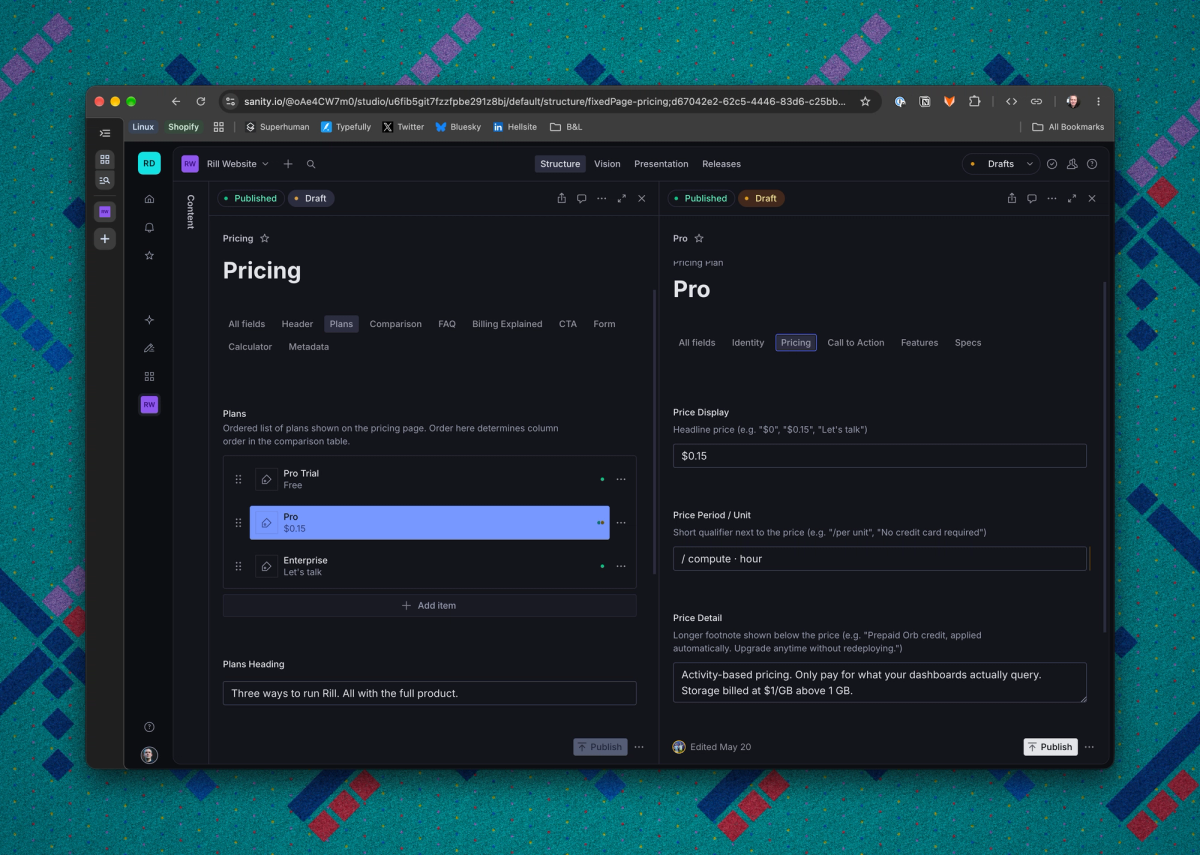
On the backend, your content lives in Sanity's Content Lake — a fast, reliable, globally available data store — and is queried with GROQ, a flexible query syntax that allows developers to fetch as much or little data as is needed to render a web page, with results cached on a global CDN.
In addition to serving web pages' basic data-fetching needs, the Content Lake supports webhooks, real-time events, and flexible cache expiry, providing a full toolkit to ensure your site's content is always up to date for your users.
Astro: best frontend framework
Astro is the part that takes your content (hosted in Sanity) and turns it into the web pages your visitors will see. It's one of the most popular open-source frameworks for content-driven sites, and in recent years has gained support for server-side rendering, dynamic data, forms, and other app-like features, making it usable for full-stack apps as well as websites.
What marketers get with Astro:
- Speed. Astro ships zero JavaScript by default; developers can add it only where needed. In a study we ran in October 2026, the median homepage across 16 marketing sites built with Astro loaded 0.69 MB of JavaScript, compared with 1.55 MB across 16 Webflow-based sites. In the same testing, the median homepage's desktop Lighthouse score was 63 on Webflow, compared with 95 on Astro.
- Any page from any content. Webflow's built-in CMS ties each content type to just one URL pattern and template — good enough for basic blogs, but not flexible enough for demanding B2B content sites. In an Astro frontend, developers have total control over how content maps to URLs and sections on the site.
- Markdown where it fits. Alongside support for Sanity or other headless CMS platforms, Astro has a full Markdown-based content layer. Docs and developer-written content can live as flat files in Git, right next to the code.
- Static simplicity, full-stack flexibility. Astro doesn't just handle content sites. Developers can add API endpoints, form handlers, middleware, or session storage, and pages can mix static and dynamic content so you can choose the best balance of performance and freshness based on what's best for your content.
Hosting: Cloudflare, Vercel, or your platform of choice
Astro sites can be deployed to any hosting platform, either in the cloud or on-premises. By default, Astro websites are deployed as static HTML pages that can be served from any web server or CDN. But it's easy for developers to convert a whole site or even individual pages to server-rendered code that can run on any Node.js server, or on any major cloud platform via an adapter plugin.
Astro runs best on modern application clouds like Cloudflare, Vercel, and Netlify. We've worked with all three — they each have particular strengths and drawbacks, but clients have used them all successfully. This website is hosted on Vercel, which I find offers the fastest builds & deploys, though Cloudflare has the best cold-start performance and lowest cost.
Additionally, each of the major public cloud providers (AWS, Azure, GCP) has a "serverless" offering that works well with Astro; if you already use one of these for existing workloads, you can deploy an Astro site without having to set up with another vendor.
Forms and CRM: HubSpot or your existing tools
Webflow has both a built-in form builder as well as integrations (via Webflow Apps) with HubSpot, Formspree, and numerous other form tools, CRMs, or CDPs. But many businesses need greater control over how customer data is handled than Webflow supports, especially in regulated industries like healthcare or finance.
Astro supports both embedded HTML/JS forms and fully custom server actions, allowing developers to precisely route your customers' information to the right data stores while ensuring their privacy and security are taken care of.
How the pieces fit together
Marketers change content in Sanity, developers change code in Git, and your AI agents can work in either one. Sanity's MCP server and CLI are excellent, and give agents much more robust access to your content than other headless CMSes like Contentful or Storyblok.
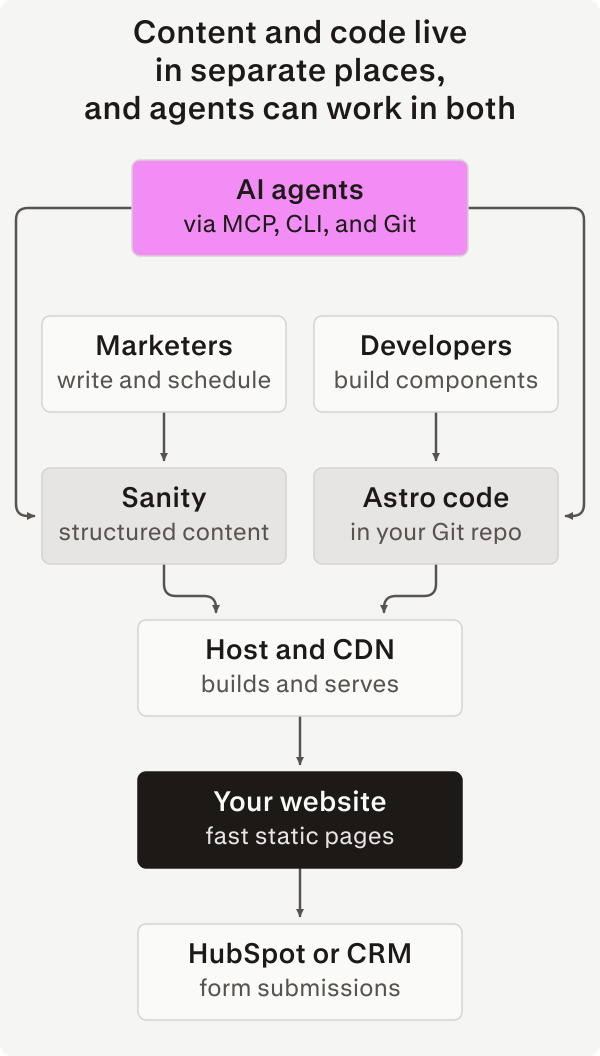
In fact, I do a lot of my own Sanity content management through agents: blog posts like this one often start as drafts set up by Claude or Codex, with me doing final touches and SEO prep in the Studio. From an editor's or developer's point of view, whether a piece of content lives in Sanity or in code is just an implementation detail.
Also considered
Tool | Best for | Why we don't default to it |
|---|---|---|
Framer | Design-led marketing sites | Thin CMS, limited integrations, same lock-in as Webflow |
WordPress | Editorial sites with large plugin needs | Flexibility takes plugins and custom code, each one more to secure and update. You maintain it yourself or pay for managed hosting like WP Engine or Kinsta. |
Contentful | Large enterprises with existing contracts | Rigid content modeling managed separately from code, putting onus on developers to keep models and frontend in sync; higher costs with a steeper ramp at scale |
Payload | Teams that want a self-hosted CMS | You host it yourself as a Next.js app, with few managed options. Its future is unclear since Figma acquired it in 2025. |
Next.js | App-like or interaction-heavy sites built by teams with deep React experience | Ships far more JavaScript by default than most content sites need; APIs for managing caching and performance are non-standard and tend to change a lot |
Who runs it: Bits&Letters
A composable stack removes Webflow's limits, but someone still has to build and run it. Webflow's real selling point has always been that marketers can ship pages without a developer. Take the developer away from a Sanity and Astro site, and you can end up with a faster website that nobody on your team knows how to change.
That's where Bits&Letters comes in. Unlike Webflow, Framer, or the other platforms in this guide, we're not another subscription to manage. We're design engineers who build on Sanity and Astro every day, and we do the building (and, if you want, the running) for you. Depending on what your team needs, we work in one of two ways.
Ongoing design engineering. We work as part of your marketing team — a crew of experienced (and, as the kids say, "cracked") design engineers you can bounce ideas off of and pass work to, without having to hire a full-time marketing web team yourself. Send us a rough idea in a shared Slack channel or file a ticket in Linear, and we return a finished, live page or component, staying closely in touch to make sure the end result matches your vision. Billed as a monthly retainer, with hours reported as we go so there are no surprises.
Fixed-scope builds and migrations. Many clients just need help getting a migration done, then can have their existing dev-ops team run the site, with marketers and other editors managing pages through Sanity or edits made with a coding agent. For these engagements, we plan and build your new site codebase, migrate your data and other resources, then hand it to your team to ship and run.
Either way, you own the result. We've talked to many businesses whose web agencies lock them into long-term relationships by keeping their site's code and servers out of direct reach. Oftentimes, these agencies will also start to give worse service once the site is up and running — I once met with an e-commerce brand whose agency would routinely take eight weeks to deliver a simple landing page, while charging thousands in fees every month.
For B&L clients on ongoing retainers, your site's code and infrastructure can live in client-managed accounts from day one if that's your preference, or we can manage everything while giving your team full access to everything when needed. On fixed-scope projects, we host your Git repository and Sanity project during the build process, then transfer everything to you on final payment.
Case study: Rill
Rill, which makes a business intelligence platform used by companies like Comcast, AT&T, and The Trade Desk, came to us because their Webflow site had become a real bottleneck for their marketing team.
[Screenshots: homepage]
While Webflow was okay for simple text edits, their CMO needed to make some sweeping changes — a new pricing page, changes to onboarding free-trial users, and on top of that, a visual refresh. Rill's dev team was willing to help, but wasn't familiar with Webflow, and also wanted to be able to use the same AI coding tools they rely on to accelerate work on Rill's product code.
We rebuilt their site on Astro and Sanity, with the CMS platform managing not just text but also a block-based page builder. While key pages like Home and Pricing were set up as Astro templates, managed as code in a Git repository, the Product Overview page was based on a rich component library that Rill's team could compose into sections and pages using Sanity's live visual editing tools.
Rill's CMO and in-house designer set the direction for a light brand refresh — keeping the blue-purple shade we nicknamed "rindigo" (for "Rill Indigo"), but swapping a dark theme for light — on which we built a complete design system with responsive layouts, fluid typography, and rich web components based on the open-source Web Awesome library.
To keep the project scope reasonable and launch sooner, we worked with Rill's engineers to initially launch the new site side-by-side with the old one. The team set up Cloudflare page rules to route traffic to the new site (hosted on Netlify) for URLs that had been migrated already, falling back to Webflow otherwise.
Today, Rill's team can publish on their own, whether through Sanity Studio, having agentic tools like Claude Code work directly in the codebase, or a combination of the two, with Claude using Sanity's MCP server to make edits on the CMS layer in parallel with code changes where appropriate. Since launch, the team was able to complete the Webflow to Astro migration with almost no direct involvement from us — today 100% of site pages are powered by Astro.
On the pricing page, their plans and features now live in Sanity as structured data, making the most complex and important page on the website easier to update with confidence. Modeling their pricing and packaging as data also makes it possible to reuse this content in components or landing pages while keeping everything perfectly in sync. It also opens up new integration opportunities, like having their Stripe subscription backend become the source of truth for plans, with that data synced into Sanity without a team member having to manually make changes.
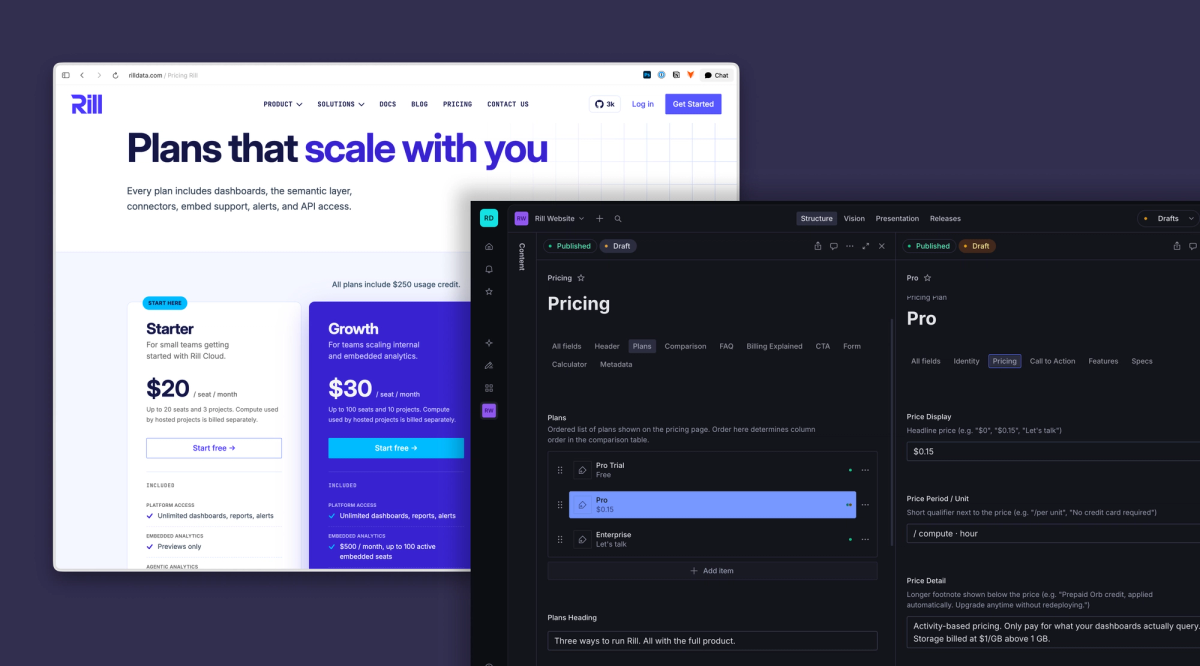
While site performance wasn't an explicit goal for this migration, we still saw a substantial improvement in both lab and field metrics on the launch of the new site, with desktop Lighthouse score of 97 on the new Astro site's homepage, compared with just 68 on the old Webflow-based homepage.
"The biggest outcome has been the speed with which we can now move in confidently updating content on our website. Updates that used to take a day and involve several steps can now be done in minutes." - Michael Driscoll, Rill
What a Webflow migration involves
Unfortunately, there's no export button that turns a Webflow site into a Sanity and Astro site, or any other code format that can be deployed outside of Webflow hosting. While Webflow does support exporting HTML & CSS for static pages, as well as CMS data, it doesn't export CMS templates, or components that incorporate CMS data or other dynamic elements.
Webflow does offer APIs that can help automate parts of a migration. But, because Webflow sites' content is integrated into the design, and every site is formatted differently, migrating typically means writing custom scripts to extract content.
AI agents can help write and run these scripts, speeding up the process. But it's not as clean as being able to export your data in full as HTML or JSON, so migrating isn't just getting your content out, but also making sure it was exported accurately.
Here's how we do it.
- Audit the current site. We'll inventory every page, CMS collection, form, integration, and tracking script, using this to write a tailored plan and acceptance criteria for the migration. We'll also use your traffic and search performance data to identify which pages matter most.
- Design the content model. From what we found in the audit, we'll decide which content becomes structured data (pricing, features, customers, people), which can be modeled as blog-like text entries, and which should stay as static page content. We structure content models for long term relevance, resilience, and reuse, while making things easy for you to edit day to day.
- Build the design system. Whether you're providing the design direction or we are, we break your design down into reusable patterns and components, because even static pages benefit from being built on a common architecture and design language.
- Extract the content. We use a mix of AI agents, site-crawling scripts, and Webflow's APIs to pull content from your live site into structured data, then feed that into your Sanity dataset or page templates, as needed.
- Map URLs and set up redirects. If the new site will be deployed to the same domain, we'll either match your existing URLs or set up redirects, ensuring that users and search engines can continue to find what they're looking for without disruption, and ensuring you maintain your search rankings.
- Launch in stages if needed. When an incremental rollout makes sense, Webflow and Astro can run side by side. We'll set up page rules or proxies so new pages route to Astro, while unmigrated pages fall back to Webflow until they're rebuilt.
- Train your team. We help your editors learn the Studio through written docs, video tutorials, and live workshops. Developers and agents get a codebase with clear conventions and docs so they can be productive right away.
A typical migration takes 4-10 weeks, depending on page count and how much the new site's design differs from the one it's replacing.
Which path fits your team?
If your team… | Then… |
|---|---|
Mostly publishes static pages and blog posts, and rarely needs custom forms, media, or interactive elements | Stay on Webflow. It does those jobs well, and you may be able to work with a Webflow expert to address pain points without a rebuild. |
Has front-end developers who can own the site long term, alongside regular product work | Move to Sanity and Astro, and plan to run it yourselves. We can build version 1.0 of the new site, then hand over a Git repo and ownership of your Sanity project. |
Ships new pages or content types at least once a month with no dedicated front-end development resources | Move to Sanity and Astro, with us as your fractional design engineering team. Hand us working briefs (or even rough ideas) in Slack, we carry things through to finished code and content in production. |
If you're in either of the last two rows above, book a call. We'll review your current site, tell you what a move would take, and discuss how our team can best work with yours.
Frequently asked questions
Can marketers edit a Sanity and Astro site without a developer?
Yes — in a couple of ways, with the right setup.
Astro sites are code, stored in a Git repository hosted on a platform like GitHub. Non-developers can create and manage Astro sites with help from a coding agent like Claude Code or ChatGPT Codex, though the results may look and sound generic if you try to build a site using only AI tools. Once your site is up and running, text and other content in your codebase can easily be edited using agents, and we'll help set up your codebase with skills and instructions so AI edits stay true to your brand voice and design system.
For CMS-driven pages, editors can write, comment on, preview, and publish content in Sanity Studio. Text-based content like blog posts or case studies is editable in a familiar interface, with rich text editing similar to Google Docs or Microsoft Word. If your site and studio include a visual page builder, editors can also assemble new pages from a library of prebuilt components.
Entirely new components, content types, or page layouts will need a developer, or at least an AI agent working in the codebase, with a developer — on your team or ours — reviewing the resulting code for security and quality.
Will I lose SEO rankings when I leave Webflow?
Not if redirects are mapped and metadata is migrated. The most important thing for SEO is that your site's content and structure remain consistent. Engines like Google associate index data with URLs; if your URLs stay the same before and after the migration, and the new pages have similar (or better) meta information as the old ones, your "search equity" should remain intact.
While we can't make any promises, Astro sites in our October 2026 sample loaded less than half as much JavaScript as Webflow sites at the median. Among sites with real-user data, median mobile LCP was 1.7 seconds for Astro and 3.2 seconds for Webflow. Faster pages and better Core Web Vitals scores can help your site's rankings.
In building your new site, we also follow technical SEO + AEO best practices and can recommend simple ways to improve how your site shows up in search or AI answers where appropriate.
Can I keep part of my site on Webflow?
Yes. (And, fun fact: many large enterprises that use Webflow tend to only use it for part of their online presence, rarely their main .com experience, for the same reasons our clients look to migrate away, but I digress.)
Both Webflow and Astro sites are just websites — we can build (or assist your developers to set up) page routing rules or a reverse proxy that sends users to either Webflow or Astro, depending on which site is appropriate for each URL.
In most cases, the routing rules are part of your codebase along with the new Astro site, with changes to routing going live simultaneously with updates to the website, so there's no additional maintenance or ops work required.
Is a composable stack more expensive than Webflow?
It depends. The software and hosting costs are often similar at the low end, and — if your CMS or traffic needs are higher than Webflow's Premium tier supports — a composable stack can be considerably cheaper.
Sanity and many Astro hosting platforms like Vercel or Cloudflare have generous free tiers. Some businesses benefit from moving to Astro even if they don't need advanced CMS features simply to realize cost savings — a rarely-edited Webflow site that would cost $25/mo or more to host can be converted to Astro as a one-time project, and deployed to Cloudflare with ongoing hosting for free.
With regard to Sanity, many marketing sites can get by on the free plan for years, only needing the paid plan if their total database size is above 10,000 documents, they need more than 20 user seats, or have security or scheduling needs that require paid features.
Who owns the code?
You do.
On fixed-scope projects, full IP ownership transfers on payment of your last invoice. Code and content live in Bits&Letters-managed repos/projects during the build. If we're handing off to your in-house team on delivery, we work with you to coordinate transferring everything to your own accounts. If we're staying involved to help manage things, we'll make sure you have access to all resources for transparency and/or to support a future handoff.
On retainers, ownership transfers as work is delivered. We can store code and resources in our accounts if that's helpful, or we can work in your repos and projects, whatever's best for you.
Can AI agents work on the site?
Yes. Your Astro + Sanity site consists of code and structured content, so agents like Claude Code and Codex can edit pages, add components, and update content directly.
As part of building out your codebase, we prepare agent instructions and skills based on your project's coding style, design system, and intended workflow. We can also coach you on how to phrase and structure prompts to most effectively get things done.